
Community Service, Made Simple
A volunteer-hours platform for Charlotte-area high school students and the organizations that host them. Find or post opportunities, volunteer, log hours, and receive official verification letters.
What Is Queen City
Volunteer Connect?
QCVC bridges the gap between Charlotte-area high school students who want to give back and local organizations that need their help. We make it effortless to discover, track, and verify community service.
Students sign in via phone number, browse volunteer opportunities posted by employers and nonprofits, register for events, and submit their completed hours.
Download official PDF service documentation letters — verified proof of community service for schools, colleges, and scholarship programs.
Employers post opportunities and review submissions. Administrators moderate activity, approve hours, and generate signed verification letters.
Built for Three Types
of Users
Students
Charlotte-area high school students browse opportunities, register, submit hours, and download PDF verification letters for college applications and scholarships.
Employers & Organizations
Local businesses, nonprofits, and community organizations post opportunities, manage registrations, and approve or reject submitted hours.
Platform Administrators
Admins moderate employer accounts, review opportunities, finalize hour approvals, generate letters, and send platform announcements.
Simple Steps
for Students
Create Your Account
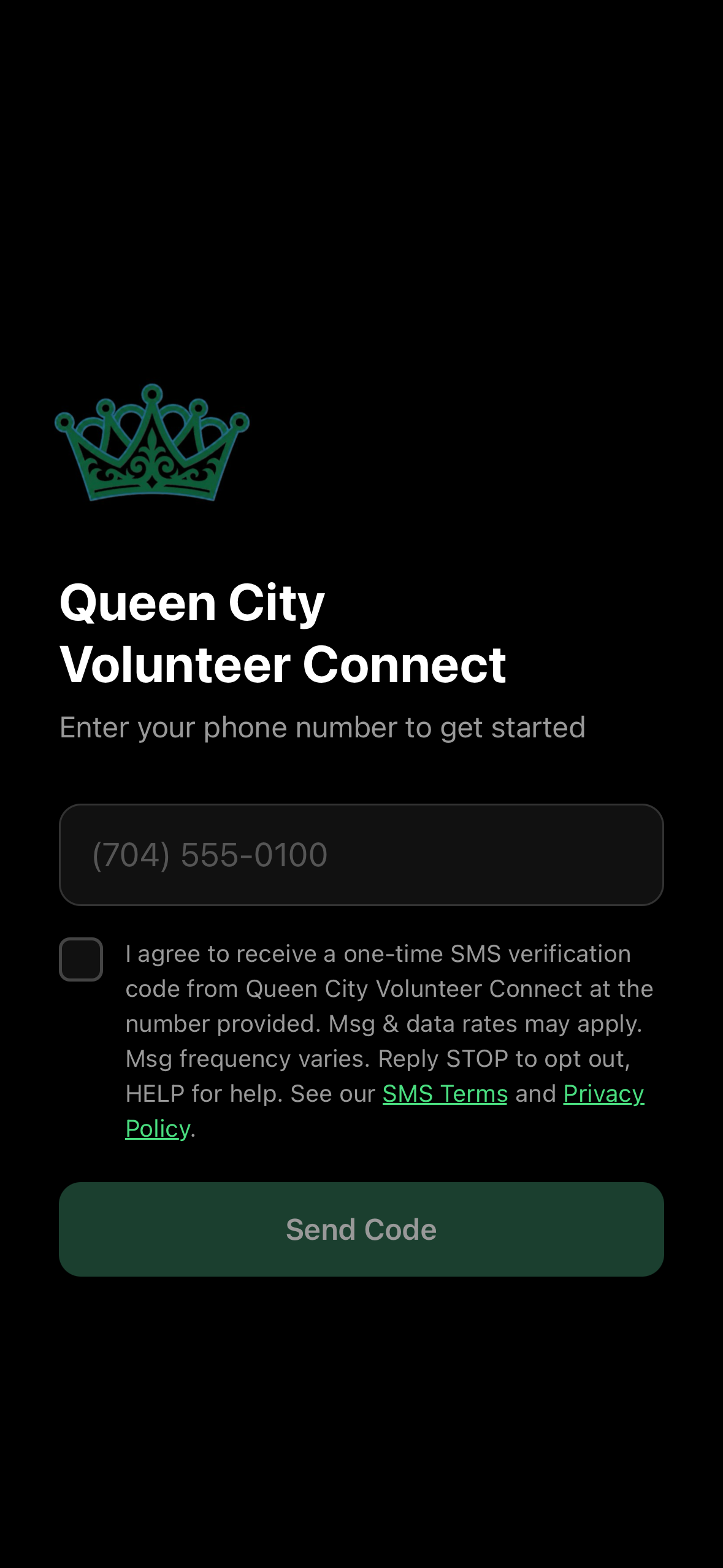
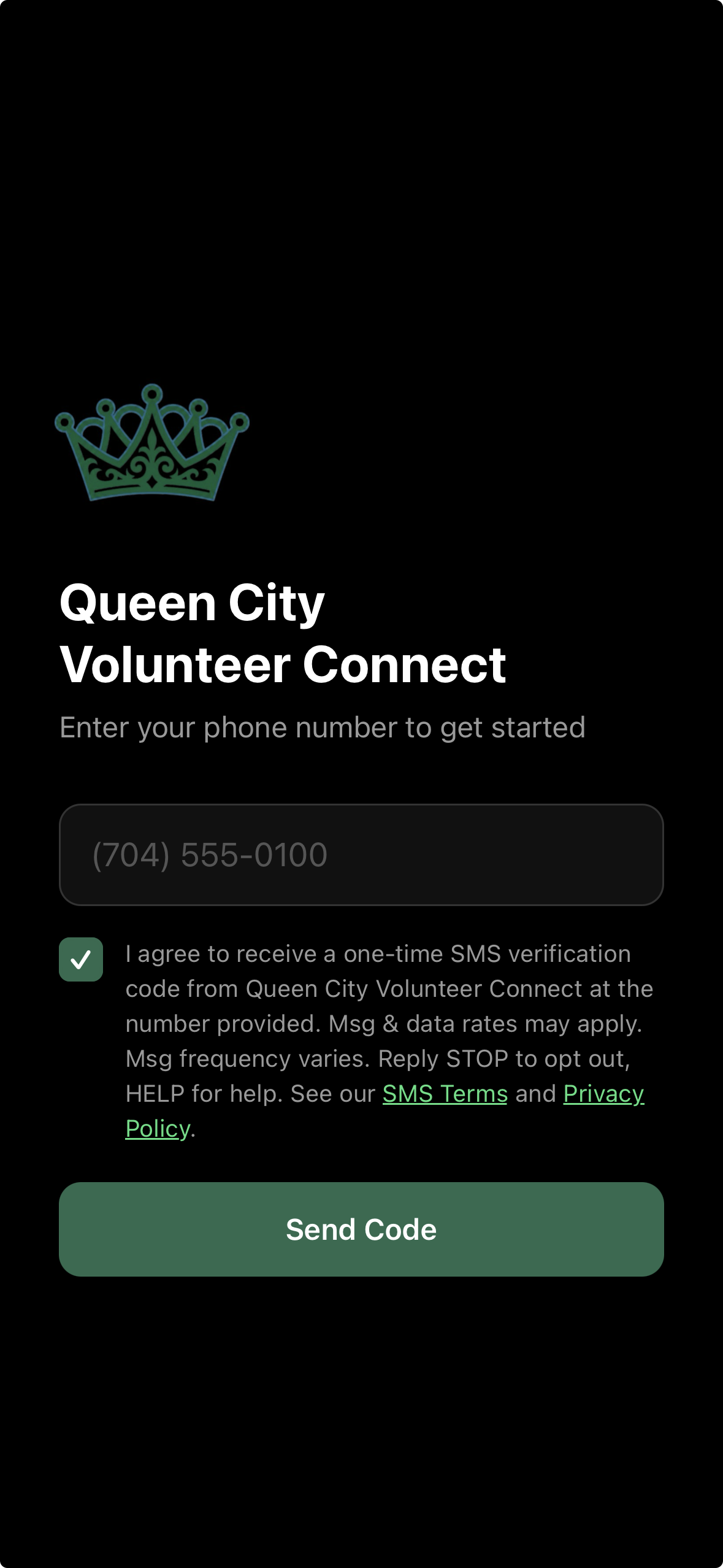
Download the app and enter your mobile number. Check the SMS consent box to agree to receive a one-time verification code, then tap “Send Code” to activate your account.
Find Volunteer Opportunities
Browse active opportunities from verified Charlotte-area employers and nonprofits. Filter by date, location, or type.
Register and Show Up
Tap to register for an event — the employer sees your name on their roster. Attend and make an impact in your community.
Submit Your Hours
Log your hours after the event. The employer reviews and approves. An administrator generates your official verification letter.
Download Your Letter
Access your official QCVC PDF letter in-app. Present to your school, college admissions, or scholarship programs as verified proof of service.
How QCVC Uses
Text Messaging
QCVC sends SMS for two specific purposes: secure account verification via one-time codes, and invitation messages from administrators to onboard new employer organizations.
Verification Codes
User enters phone number, checks the consent box, taps “Send Code,” and receives a single SMS with a 6-digit code. Code expires after a short window and is used only for authentication.
Admin Invitations
Admins may send a one-time SMS invitation to new employer organization representatives. Sent only to individuals with an established QCVC relationship.
Example Messages
Verification Code
Your Queen City Volunteer Connect (QCVC) verification code is 847392. Valid for 10 minutes. Do not share this code with anyone.
Employer Invitation
You've been invited to join QCVC as an employer partner. Open the app and use your invitation code to get started. Reply STOP to opt out.
How You Opt In to SMS Messages
QCVC obtains your express consent before any text message is sent. On the app's sign-in screen you:
- 1.Enter your mobile phone number.
- 2.Check the SMS consent box shown directly below the phone number field (it is unchecked by default).
- 3.Tap “Send Code.” The button stays disabled until the box is checked, so no message can be sent without your consent.
The exact consent checkbox shown in the app
Real screenshots of the opt-in flow
Your SMS consent is collected on its own — it is not bundled into acceptance of our Terms or Privacy Policy.
→Opt out: reply STOP
→Re-enable: reply START or email support@qcvc.org
→Full policy: SMS Terms & Messaging Policy
Serving
Charlotte, NC
QCVC is built specifically for the Charlotte metropolitan area. We connect students from Charlotte-Mecklenburg Schools and surrounding districts with vetted local organizations committed to community growth.
Are you an employer or nonprofit interested in partnering?
Partner With Us35.2271° N, 80.8431° W
Get in Touch
General Inquiries
Questions about the platform, your account, or verification letters.
support@qcvc.orgSMS Opt-Out
Reply STOP to any QCVC message, or email us to have your number removed immediately.
Charlotte, NC
Serving the Charlotte metropolitan area and surrounding Mecklenburg County.